
Products › Brickture

Point. Snap. Build it brick by brick.
Reverse instructions for the real world.
Brick sets ship instructions for a model someone else designed. Brickture lets the world supply the model: photograph a real object, and the app designs a brick version that stands up on its own — then writes the step-by-step instructions, lists every part, and lets you request the kit.
In beta on TestFlight and Google Play testing.
For adults who see brick-worthy objects everywhere
Brickture is marketed to adult builders, 21 and over. Great at chunky, characterful objects — cars, mugs, hydrants.
“My actual car, in bricks, on my desk.”
Adult builders who want a model of their thing — their car, espresso machine or mailbox — not somebody else’s set.
“Dad’s old pickup as a build kit.”
People looking for a personal, one-of-a-kind gift for Father’s Day, birthdays and holidays.
“That hydrant would make a great build.”
Builders who photograph interesting objects out in the world and want to turn them into a weekend project.
The instructions and the kit are the product
Photo-to-bricks is the starting point. What sets Brickture apart is quality instructions and a way to get the parts.
Interactive 3D build guide
A step slider where the camera flies to where each piece goes, new bricks highlighted, per-step part callouts and step check-off.
Printable booklet
Written, illustrated instructions you can print and build from at the table.
Parts list with a cost estimate
Every part by type, color and size with real design IDs, plus an estimated cost — and LDraw export.
Kit ordering (in beta)
Pick a build and request its parts as a kit from inside the app.
Built to stand up
Automatic stability repair fixes floating pieces so the model holds together.
“Describe it”
No photo handy? Type a sentence and Brickture builds from the description.
From a photo to a buildable model in about two minutes
- Snap or describeTake a photo, pick one from your library, or type a description.
- Crop and pick a sizeXS (100 bricks) up to L (600) — bigger means more detail.
- Watch it buildIn about two minutes, the model assembles itself on screen, brick by brick.
- Follow the stepsInteractive 3D guide or printable booklet, with a parts list.
- Request the kitOrder the exact parts as a kit (in beta).
Builds, measured
photos processed without a pipeline failure
In a July 2026 stress test of 20 photos, every one produced a model — with 9 of 10 chunky objects rated clearly recognizable. Brickture is honest about what makes a great build: chunky, characterful objects.
104 steps, 593 bricks
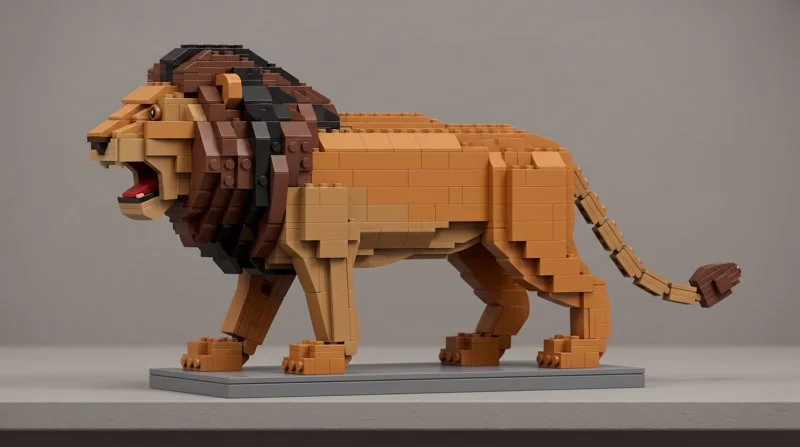
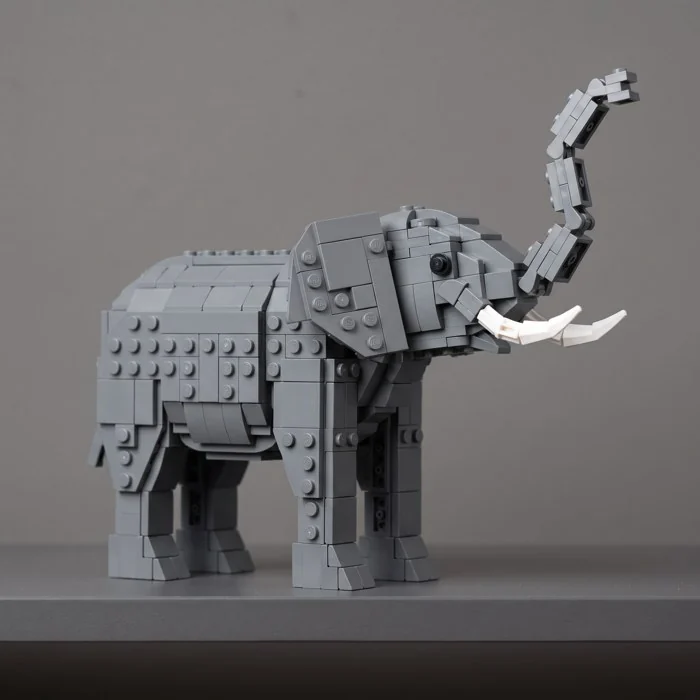
A recent Large build of a lion: 593 bricks across 104 instruction steps. An elephant: 610 bricks, 112 steps.
Stability you can measure
In a 16-build comparison at app sizes, 15 of 16 builds came out the same or more stable after the stability fix.
In beta on both stores
Available to testers on iOS TestFlight and Google Play testing.
Building sets are the fastest-growing corner of toys — and adults are driving it
growth in US building-set sales in 2025, while total US toy dollar sales grew 6%.
global building-set growth in 2025 — the sixth consecutive year of growth. Nearly 40% of European consumers bought toys for themselves or another adult.
growth in US toy sales to adults in the first half of 2025 — adults continue to drive market growth.
Everything you need to advertise Brickture
Positioning, approved copy, targeting, keywords, claims with their sources, and downloadable assets. Every claim here is verified — please use them as written.
Positioning statement
For adults who love building things and see brick-worthy objects everywhere, Brickture is the app that turns one photo of a real-world object into a buildable brick model — with step-by-step 3D instructions, a parts list with a cost estimate, and kit ordering in beta. Great at chunky, characterful objects.
Approved headlines & taglines
- Point. Snap. Build it brick by brick.
- Reverse instructions for the real world.
- The world is your brick set.
- See it. Snap it. Build it.
- Turn photos into brick builds.
25-word description
Photograph a real object and Brickture designs a brick model that stands up — with 3D step-by-step instructions, a parts list, and kit ordering in beta.
50-word description
Brick sets ship instructions for someone else’s model. Brickture writes them for yours. Photograph a real object — a car, a mug, a hydrant — and in about two minutes you get a buildable brick model, an interactive 3D build guide, a printable booklet, and a parts list with a cost estimate. Kit ordering in beta.
Key messages
- Lead with the instructions and the kit, not the photo trick.
- Your object, not a set. The world supplies the model.
- Built to stand up — stability repair is automatic.
- Numbers over adjectives: four sizes, 100–600 bricks, 100+ steps at Large.
- Honest about fit: great at chunky, characterful objects.
Audience & targeting
- Age: adults 21+ (marketing positioning; content is all-ages safe).
- Interests: adult brick building, model building, DIY and maker hobbies, desk toys, personalized gifts.
- Moments: Father’s Day, birthdays and holiday gifting.
- Platforms: iPhone and Android.
Search keywords
From the app’s store keyword set.
Channels
- Adult builder communities — brick-building forums and fan sites, with value-first posts showing real builds.
- YouTube builders who review custom-build tools.
- Short-form video — TikTok, Reels and Shorts: photo → model assembling → finished build.
- App Store and Google Play search.
Calls to action & links
- Get launch news → https://www.takgio.com/brickture.html
- Read the case study → https://www.takgio.com/case-study-entertainment-brickture.html
Approved claims & sources
| About two minutes from photo to finished model | takgio build timing, 2026 |
| Four sizes: XS 100, S 200, M 350, L 600 bricks | App size budgets |
| A Large lion build: 593 bricks, 104 steps | takgio build record, 2026 |
| 20 of 20 photos processed without a pipeline failure | takgio stress test, July 2026 |
| 15 of 16 builds the same or more stable after the stability fix | takgio 16-build comparison |
| Kit ordering in beta | Current app |
Do
- Say “brick” or “brick-built”. If compatibility must be mentioned, say “compatible with leading brick brands”.
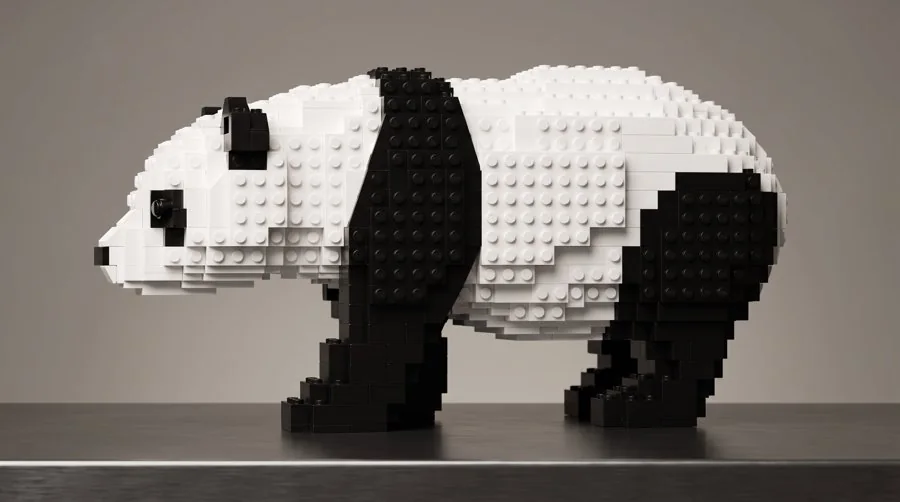
- Use Brickture’s own build pictures (lion, panda, elephant) from the assets below.
- Say “in beta” for kit ordering.
- Use American spelling (color, gray).
Don’t
- Use any brick-brand name in ad copy, or name competitors.
- Claim it works on anything — no people or pets, no “photorealistic”, no kids imagery.
- Claim anyone has hand-built a model from the instructions.
- Quote prices, credit packs or tiers — none are final.
- Say “no account” — sign-in is required.
- Name the technology vendors behind the pipeline.
Official links & policies
Ad platforms and app stores ask for these. Use them exactly as written.
| Website | https://www.takgio.com/brickture.html |
|---|---|
| Privacy Policy | https://bricksnap-takgio.fly.dev/privacy |
| Terms of Service | https://bricksnap-takgio.fly.dev/terms |
| Support | https://bricksnap-takgio.fly.dev/support |
| Support email | support@takgio.com |
Privacy Policy and Terms of Service effective September 17, 2026. Links checked September 28, 2026.
Downloadable assets
Pictures generated by Brickture. Use them unmodified.
In beta. For LEGO® bricks or any compatible system. LEGO® is a trademark of the LEGO Group, which does not sponsor, authorize, or endorse Brickture.
Brickture is our own product. For clients, we also build vision & creative tools, apps that end in a physical product, social & party games, and experiences for AI glasses.
Brickture is one of the AI products takgio builds and ships.
takgio designs, builds and launches AI products end to end — in construction, entertainment, legal and civic, and education.
Build with us. Invest with us.
A product to build, a partnership, or a conversation about takgio’s growth.